Right-click a folder, or press one button.
Get a ZIP your AI can actually use.
Zip Stripper copies your project, takes out the junk, the giant screenshots and every password it can find, and puts a clean ZIP for ChatGPT, Claude or Gemini right on your clipboard. Start from File Explorer or from your Library page. Your real folder is never touched.
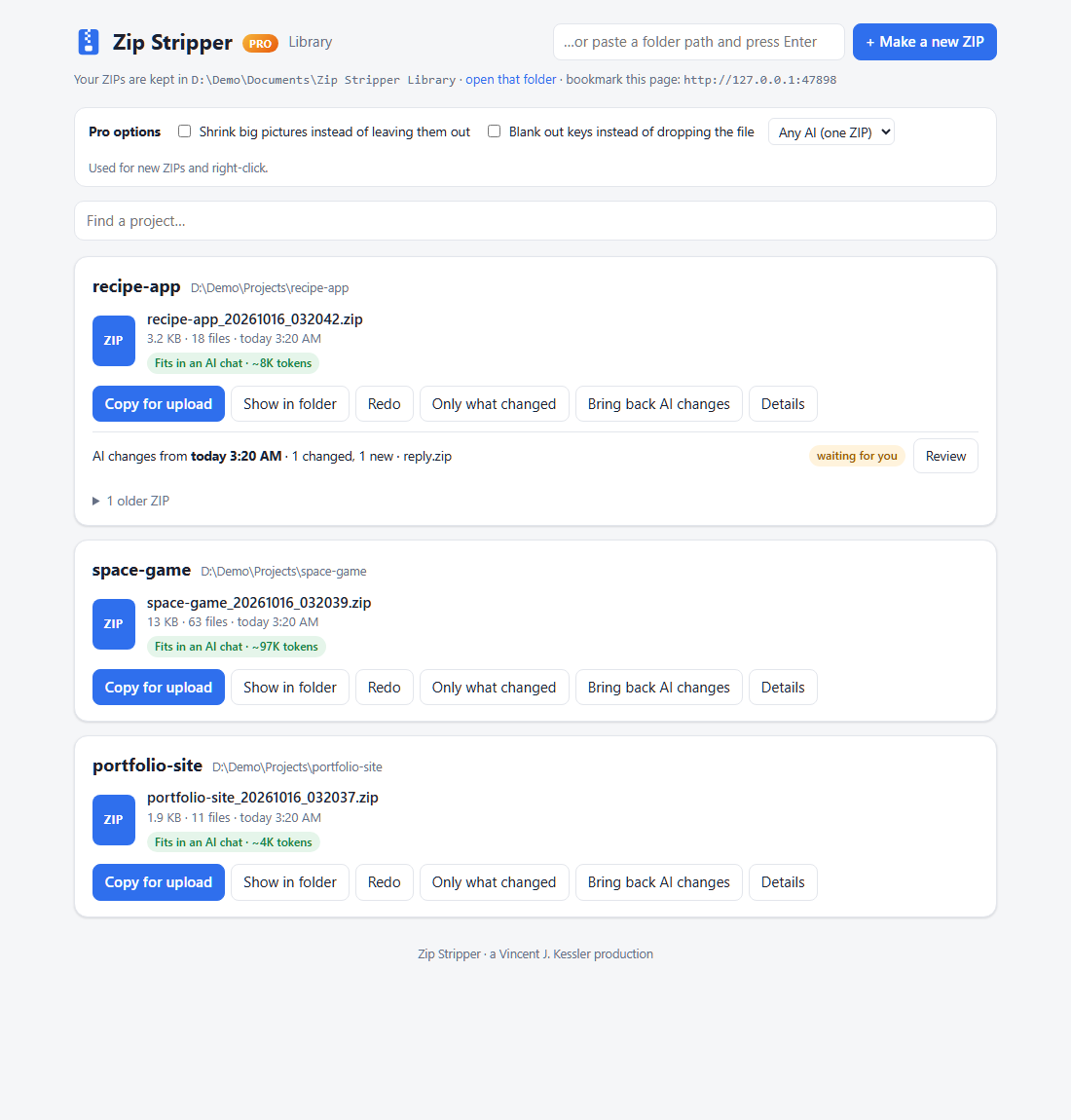
Two ways in. Both end with Ctrl+V.
No command line. No uploading 400 MB of node_modules. No accidentally pasting your API key into a chat.
Right-click any folder
- Right-click the folder → Strip & Zip for AI Upload.
- The clean ZIP is made and copied to your clipboard.
- Ctrl+V into ChatGPT, Claude or Gemini.
Fastest when you're already looking at the folder.
One button, every ZIP you've made
- Open your Library page (bookmark it; it starts with Windows).
- Make a new ZIP from any folder, or press Copy for upload on one you made before.
- Ctrl+V into ChatGPT, Claude or Gemini.
Best for re-sending, redoing, and keeping track of every ZIP.
What gets taken out (and what doesn't)
Everything left out is listed in a plain-English receipt, so you always know what the AI did and didn't see.
Your secrets
.env, credentials, certificates, SSH keys, and any file with an API key inside (OpenAI, Anthropic, GitHub, AWS, Google, Stripe…). The key itself is never printed.
What your .gitignore says
Root and nested .gitignore files are respected, so private data stays home.
The junk
node_modules, virtual environments, caches, build output, logs, old ZIPs.
The bloat
Duplicate files go in once. Big screenshots and videos are listed, not shipped. One real project went from 74 MB to 1 MB.
A library of everything
Every ZIP you made, newest first, on a page in your browser. Redo, copy again, or read the receipt any time.
A real ZIP
Not one giant text file. The AI gets your folders and files, so it can unpack, run and test your project.
Zip Stripper Pro: the round trip
Free gets your project to the AI. Pro gets the AI's work back into your project, safely, and keeps every trip small.
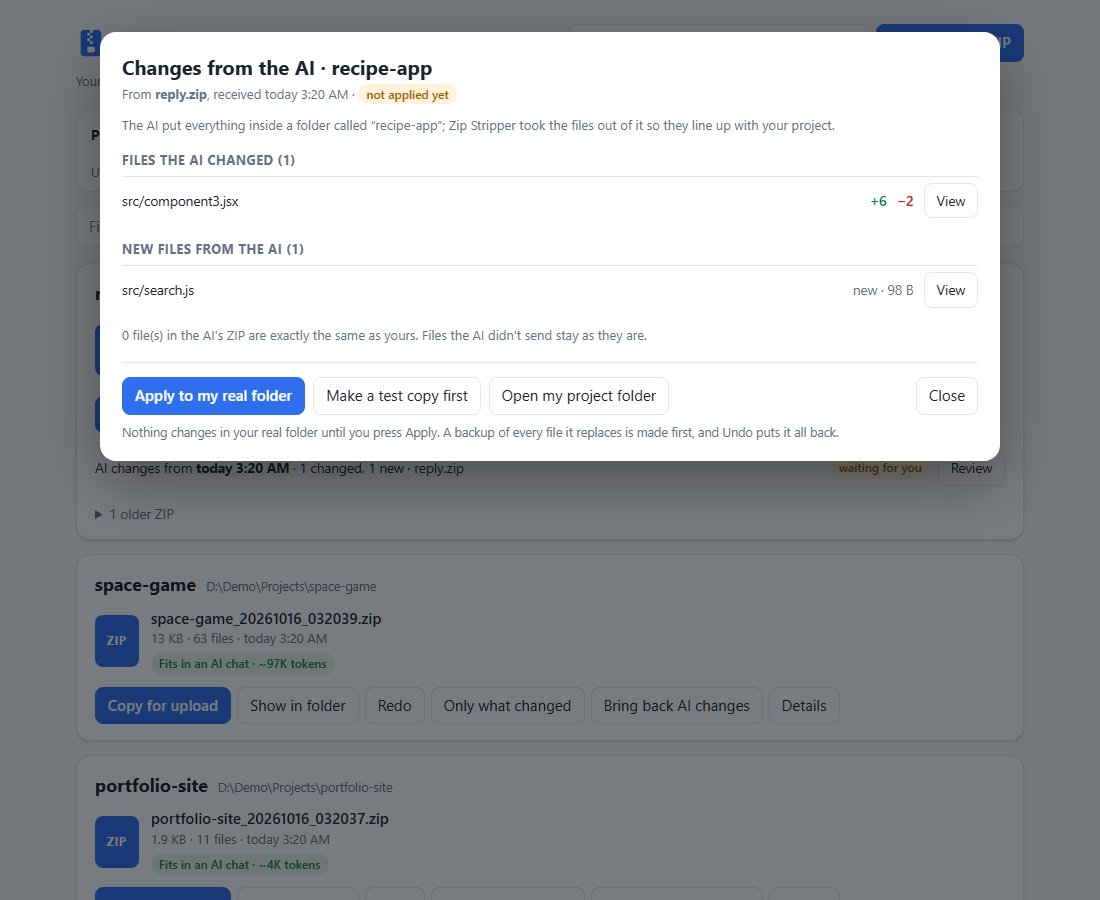
Bring back AI changes
Drop the ZIP the AI gave you onto the page. See exactly which files it changed, line by line. Test it on a copy. Apply with a backup. Undo in one click.
Only what changed
After the first ZIP, send just the files you changed, plus a change list the AI can read.
Fit for Claude / ChatGPT / Gemini
Most important files first. Too big? It splits into Part 1, Part 2… in a sensible order.
Blank out keys
Keep the file, lose the key: <REDACTED: OpenAI API key>. The AI still sees your code.
Shrink pictures
Smaller copies of big images go in, so the AI can still see your art and screenshots.
How it compares
Text-digest tools are great for pasting a repo into a prompt. Zip Stripper is for handing a project to an AI and getting it back.
| Zip Stripper | Text-digest tools e.g. Repomix, Gitingest | |
|---|---|---|
| What you get | A real ZIP with your folders | One big text file |
| Secret check, .gitignore, token count | ✓ | ✓ (Repomix) |
| Right-click, no command line | ✓ | – |
| Library of everything you sent | ✓ | – |
| Bring the AI's changes back safely, with undo | ✓ Pro | – |
| Only-what-changed follow-ups | ✓ Pro | – |
Pricing
Zip Stripper
- Clean, secret-free ZIPs
- .gitignore, junk and bloat removal
- Library page + Copy for upload
- Open source (MIT)
Zip Stripper Pro
- Everything in Free
- Bring back AI changes, with test copy, backup and undo
- Only-what-changed ZIPs
- Fit for Claude / ChatGPT / Gemini (auto-split)
- Blank out keys · shrink pictures
- One-time payment, yours to keep
Questions
Does it change my project?
No. It copies your project to a temporary folder, cleans the copy and zips it. Bringing AI changes back (Pro) only touches your folder when you press Apply, makes a backup first, and can undo.
Does anything get uploaded anywhere?
No. Zip Stripper runs on your computer. The library page only listens on your own machine. You decide what to paste into which AI.
Will it catch every secret?
It catches the common ones: key files, credential files and well-known API-key formats. No pattern check can promise to catch everything, so every ZIP comes with a receipt listing what was found.
Windows says "Windows protected your PC".
New open-source apps aren't code-signed yet. Click More info → Run anyway. You can read every line of the free version on GitHub.
Mac or Linux?
The command-line tool and the library page work anywhere Python runs. The right-click menu and auto-start are Windows-only for now.
Is Pro a subscription?
No. One payment, and that version is yours.